
Samurai TMS
The TMS for road transport and container haulage: from email to margin in one system.
Samurai TMS by Bonsai Software is a transport management system for road hauliers and freight forwarders with their own trucks and subcontracted carriers, from container haulage to distribution. Samurai reads transport orders from your inbox, calculates the margin per trip before you plan, tracks Portbase on the order and books invoices in your accounting system.
You approve and plan. Samurai does the rest.
- From inbox to planned in under a minute
- From €30 per truck per month
- Live in weeks
- Your data stays yours
Sound familiar?
Typing every order twice.
Customers email PDFs and container lists. Someone retypes them into the TMS, then hunts for the typo.
Planning in Excel next to your TMS.
The real board lives in a spreadsheet or on WhatsApp. What a trip costs is nowhere to be seen.
Margin only after the invoice.
Only when the carrier's invoice arrives do you find out a trip lost money. By then it has already run.
That costs hours every day, and margin you never see slipping away.
Who it's for
Built for road transport, from containers to distribution.
For hauliers and freight forwarders with roughly ten to two hundred trucks, their own or from regular subcontracted carriers, who receive their orders by email and PDF. Samurai pays off most from around 25 orders a day: that is where retyping adds up fastest.
From email to margin, in eight steps.
One order runs through one system: from your customer's email to the booking in your accounts. You decide at the moments that matter.
What you see in the video
Samurai TMS: from email to margin in one system
- [0:00]
Intro
Retyping orders from emails. Excel next to your TMS. Margin only after the invoice.
There's a better way.
- [0:05]
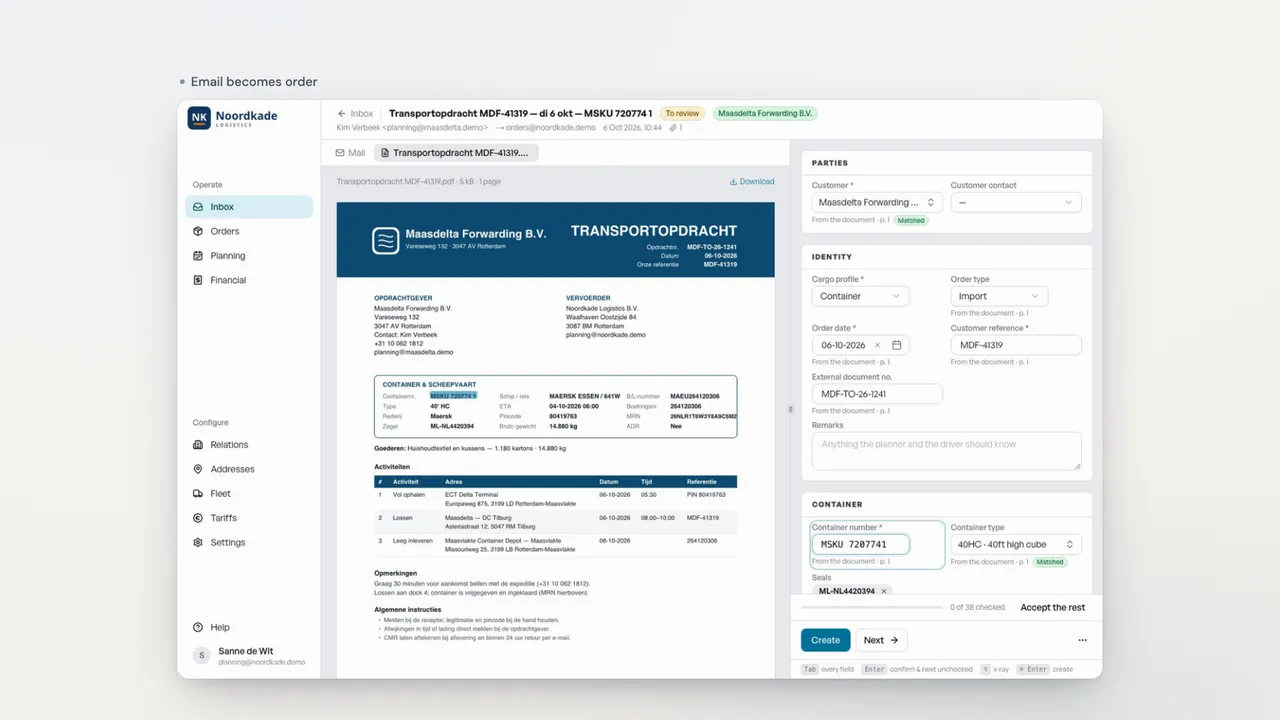
Emails become orders. In any language. You only look at what's off.
Step: Inbox → Check.
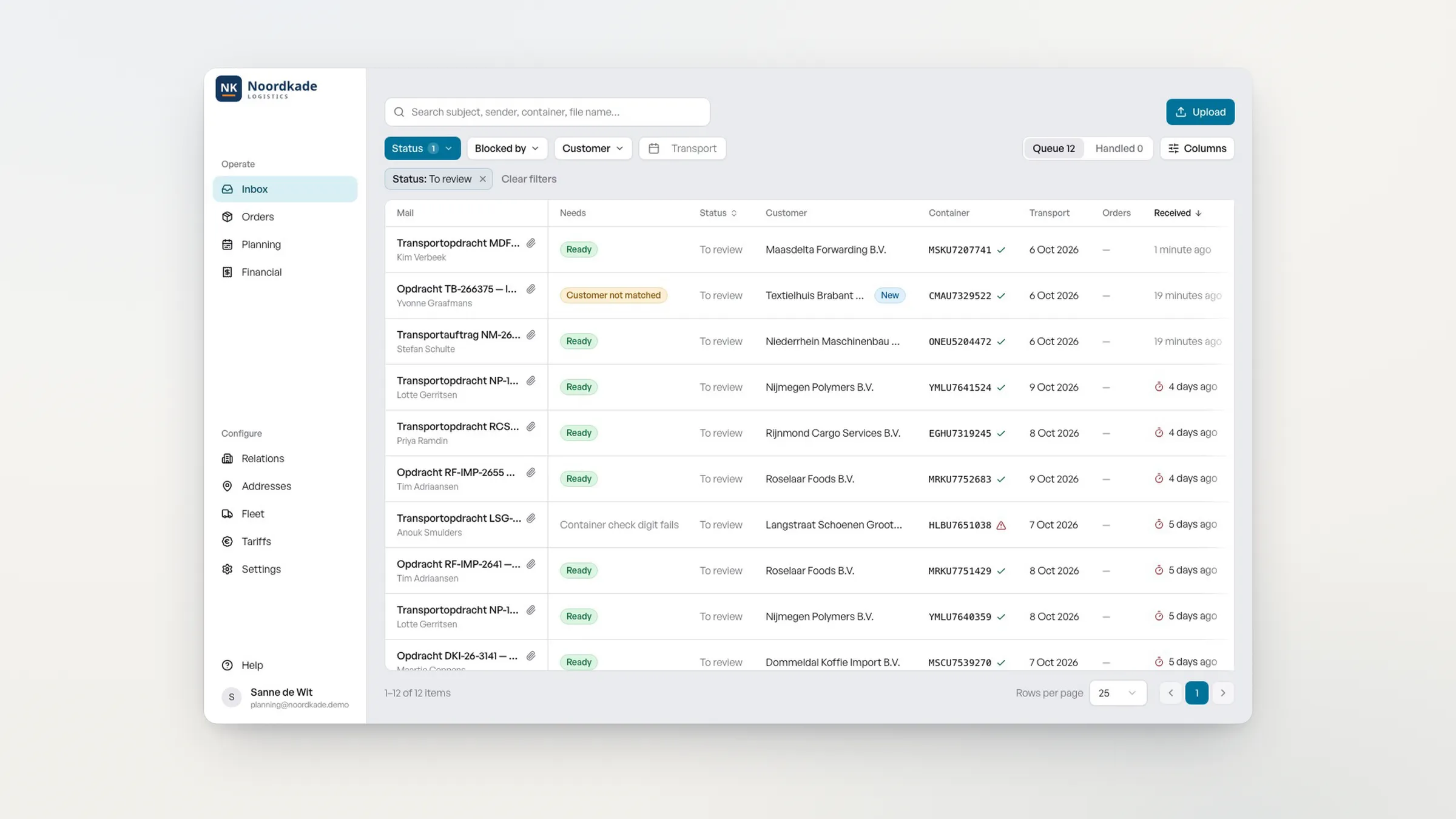
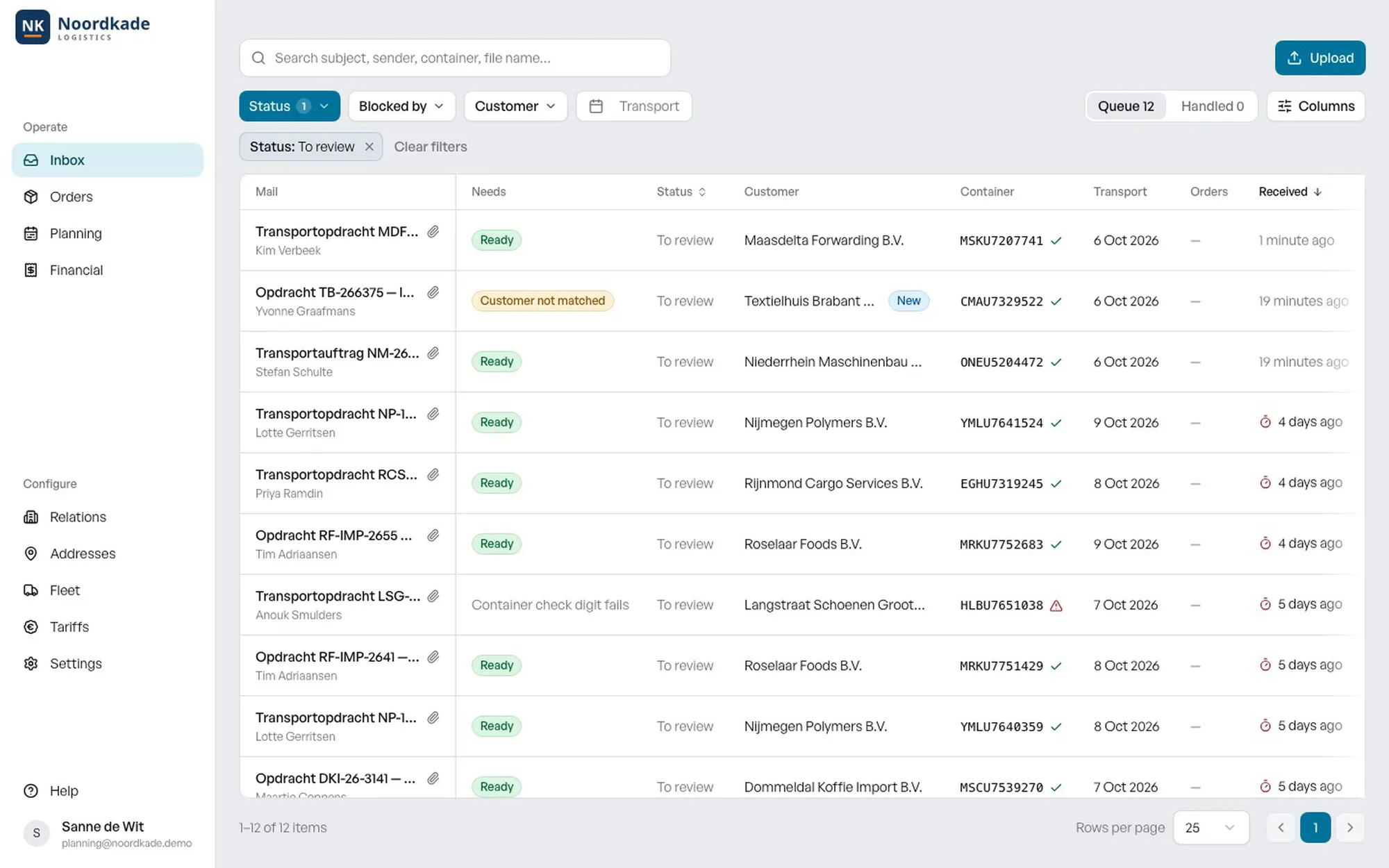
Samurai's inbox reads incoming transport orders automatically. Most are "Ready"; only orders with an exception need attention, such as "Customer not matched".
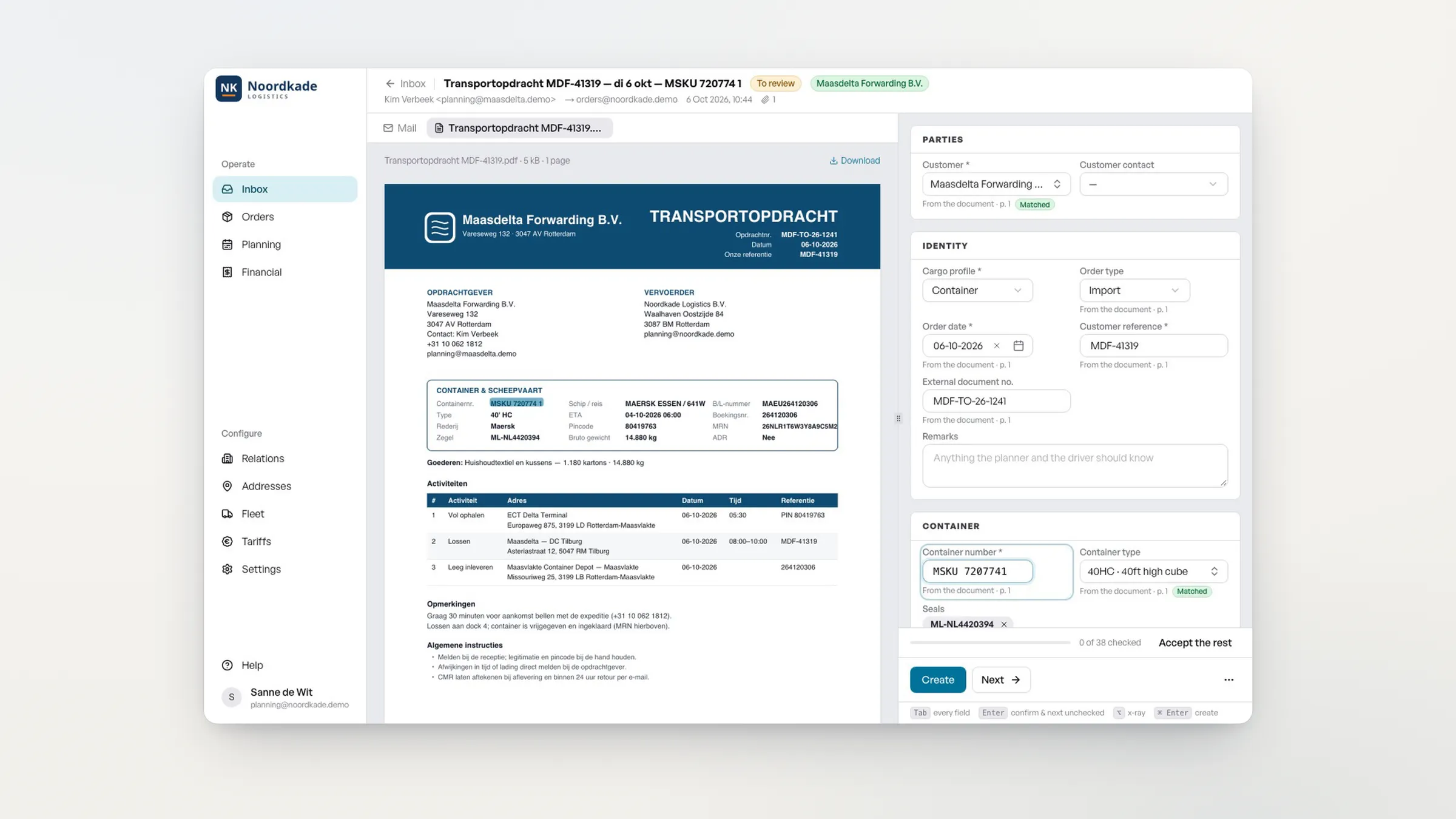
For an order from a Dutch forwarder, Samurai shows every field it read from the Dutch document: "38 of 38 checked", Dutch document → English order. The planner clicks "Create". Samurai creates the order and drafts the order confirmation for the customer.
- [0:20]
From inbox to planned in under a minute. Measured in one continuous take.
Step: Plan.
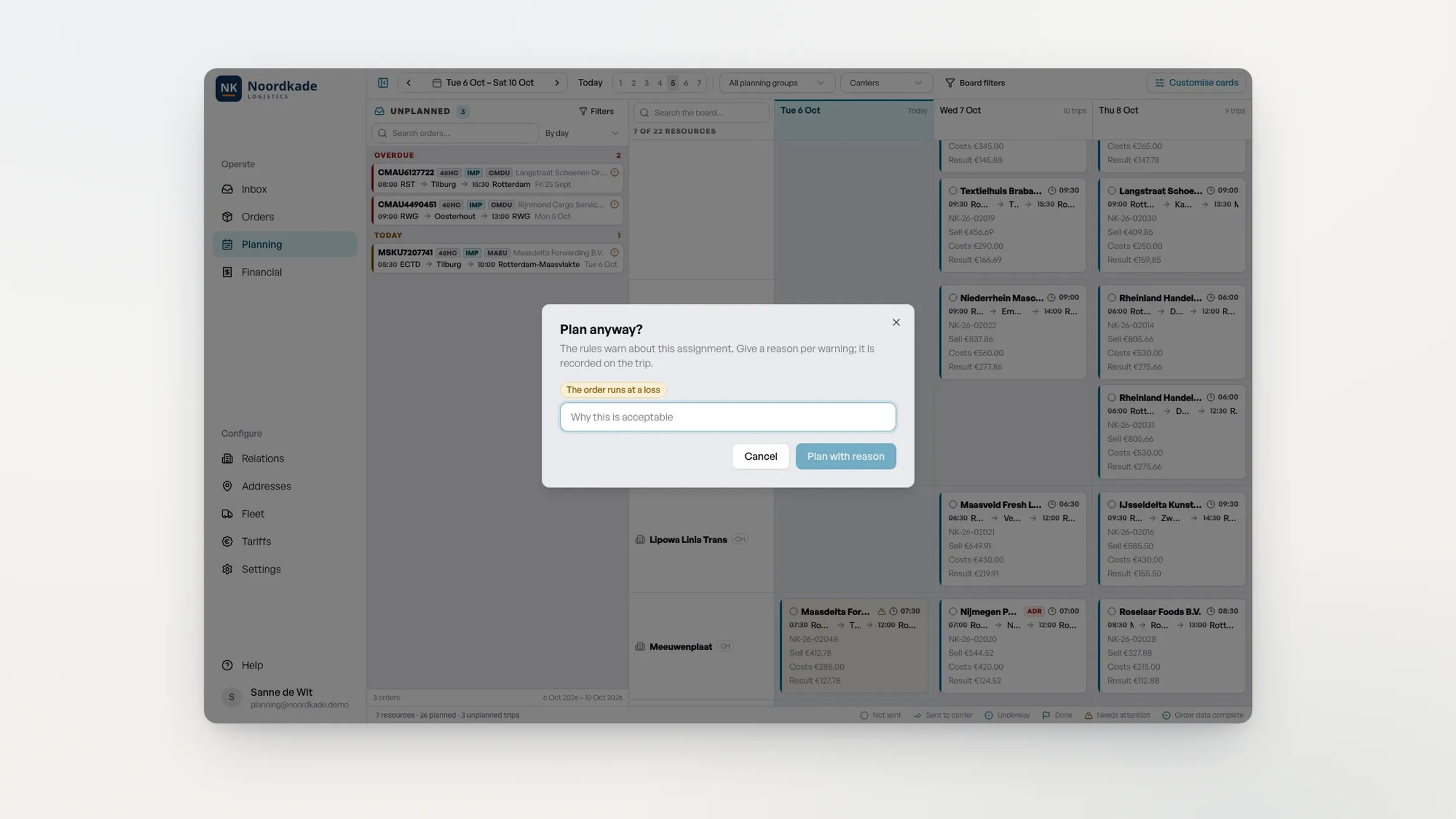
On the planning board, the planner drags the new order to a carrier. Samurai warns: "Plan anyway? The order runs at a loss." The planner cancels and drags the order to another carrier. The card shows the sale, the costs and the result straight away. "Send to carrier" sends the transport order: "Sent to carrier".
- [0:44]
Delivered and complete. POD and Portbase on the order.
Step: Delivered.
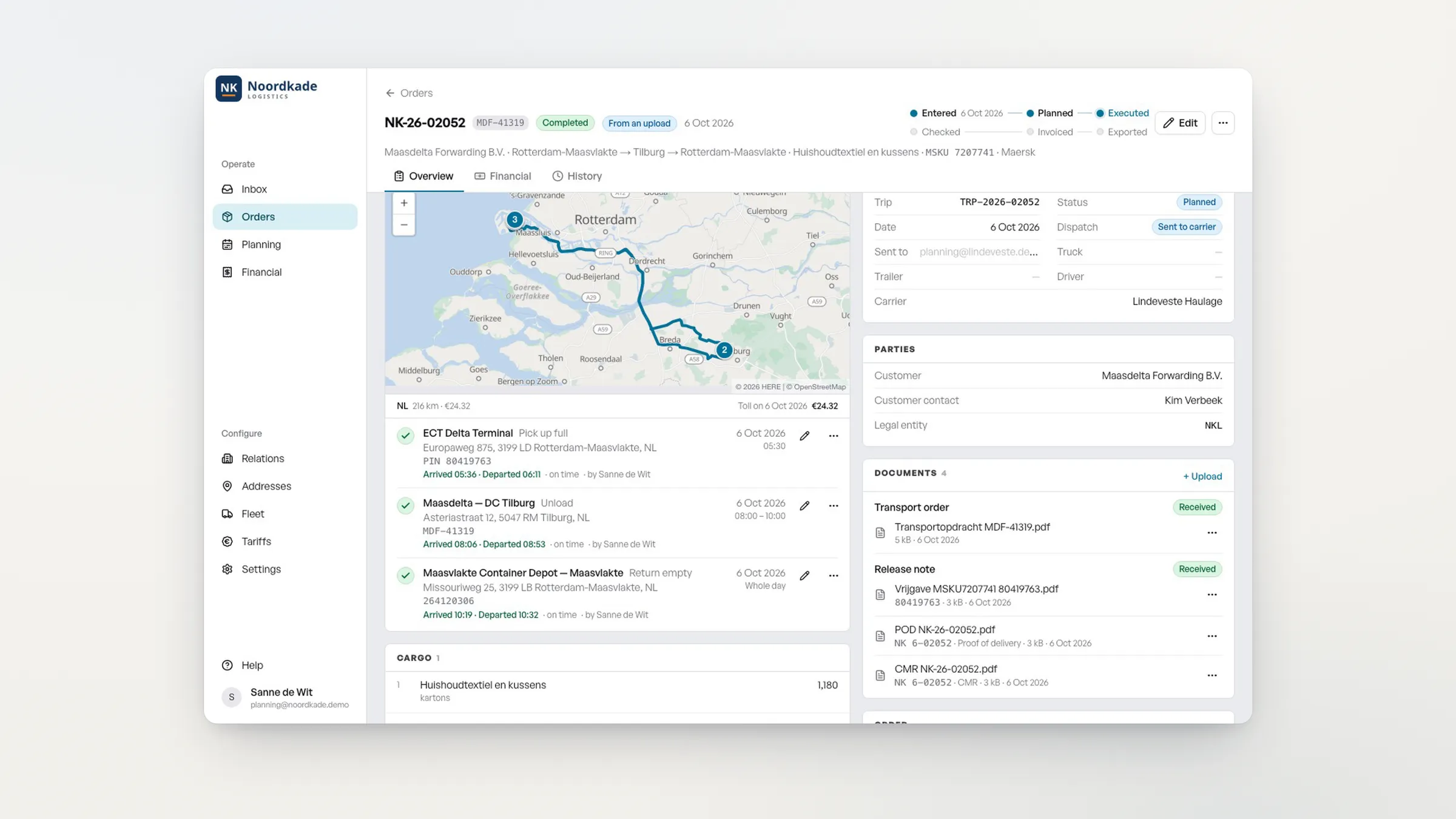
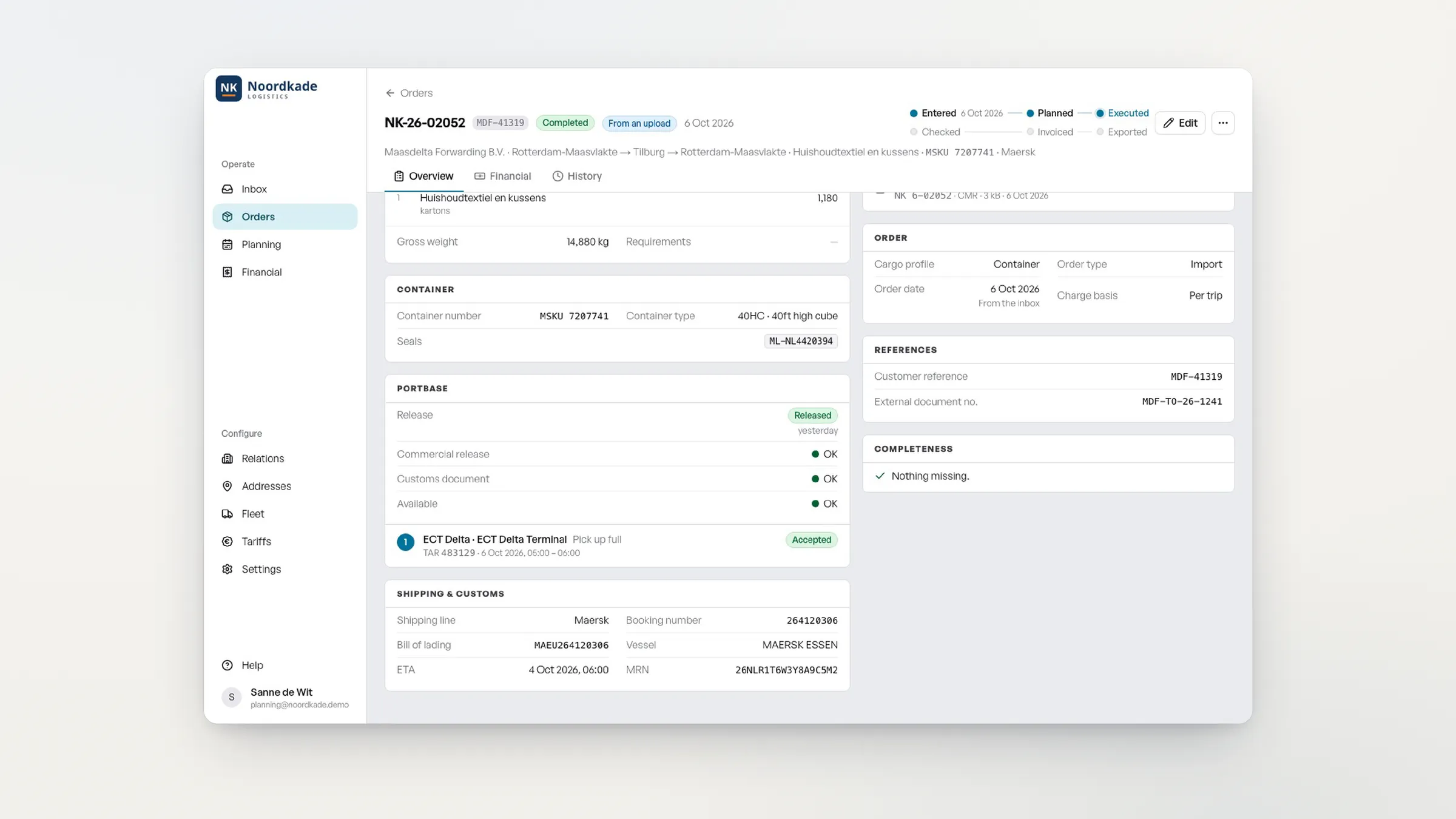
The order is completed. Portbase reports: released, TAR accepted. The POD and the CMR are on the order.
- [0:54]
Margin per trip, instantly. Price from your contract. Checked and invoiced.
Step: Checked → Invoiced.
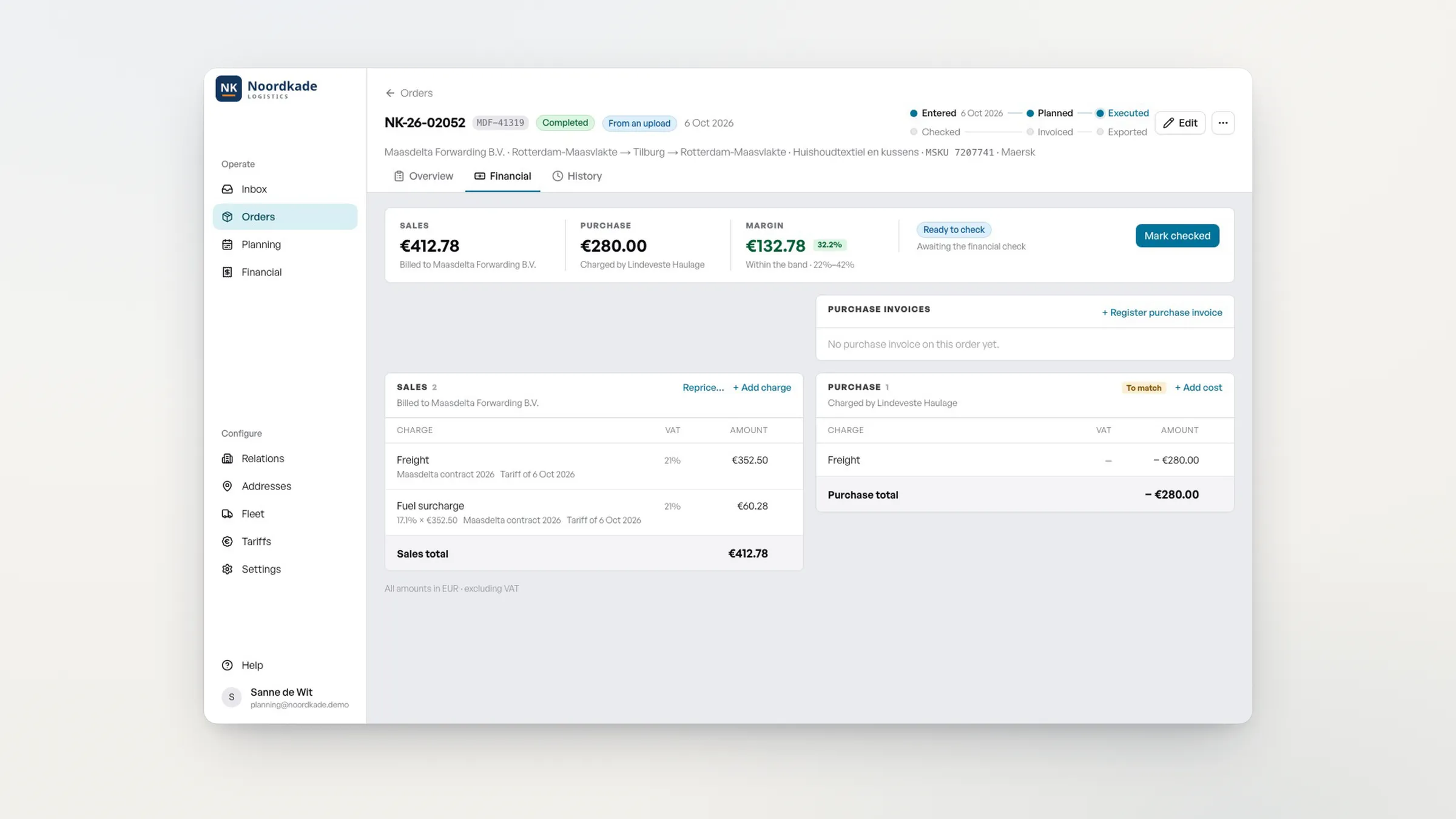
The selling price and the fuel surcharge come from the customer contract automatically. The margin is 32.2%, within the band. The planner marks the order as checked and issues the invoice: "1 order invoiced on 1 invoice".
- [1:09]
Carrier invoice matched automatically.
Step: Purchase matched.
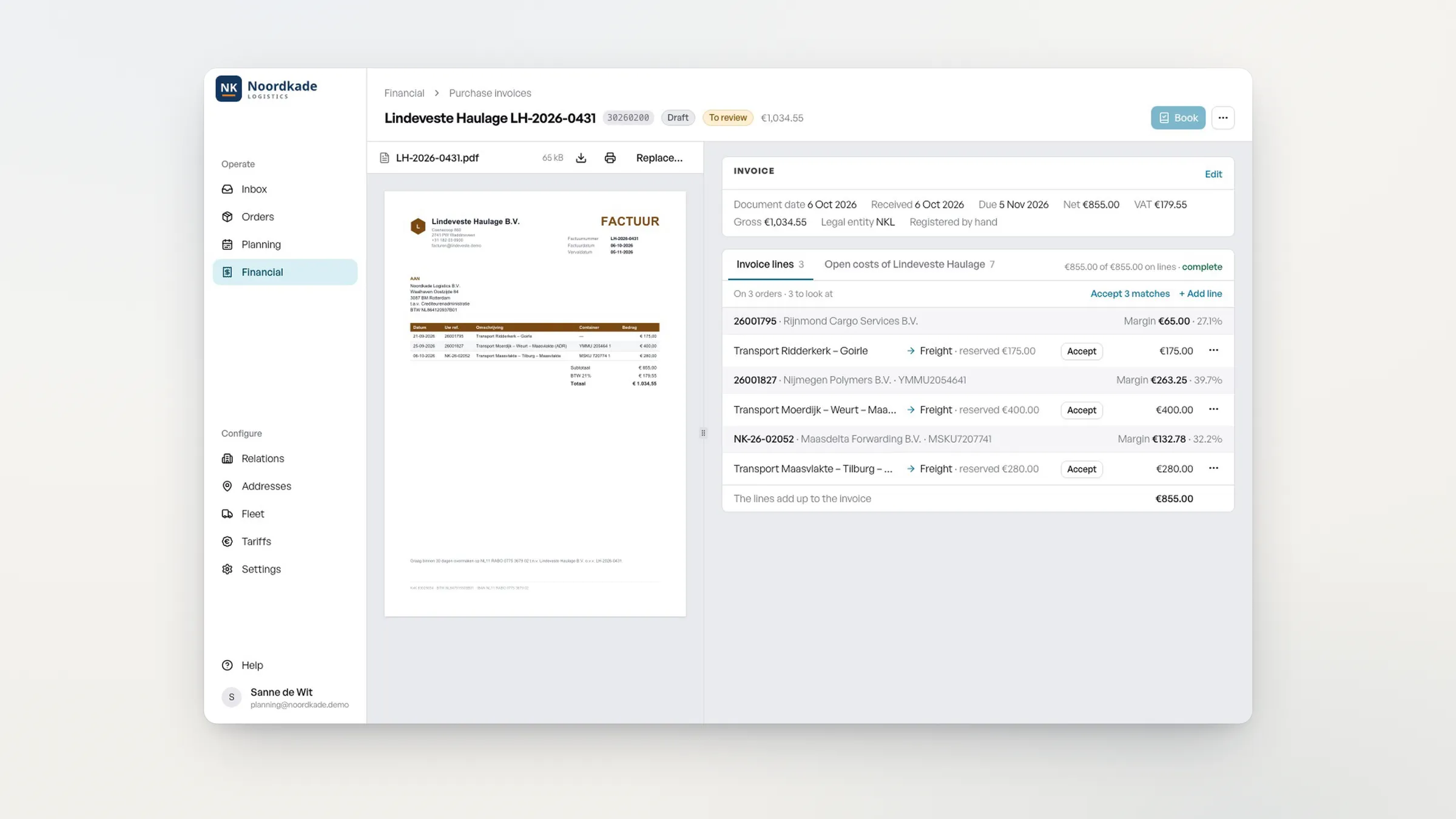
The carrier's purchase invoice is matched to the orders line by line, with the margin per trip. After "Accept 3 matches" the invoice is ready to book.
- [1:19]
Booked in Exact.
Step: In Exact.
The Exact log shows the sales invoice and the purchase invoice for this trip with the status "In Exact".
- [1:24]
Samurai works the way you work. Your rules, your rates, your board.
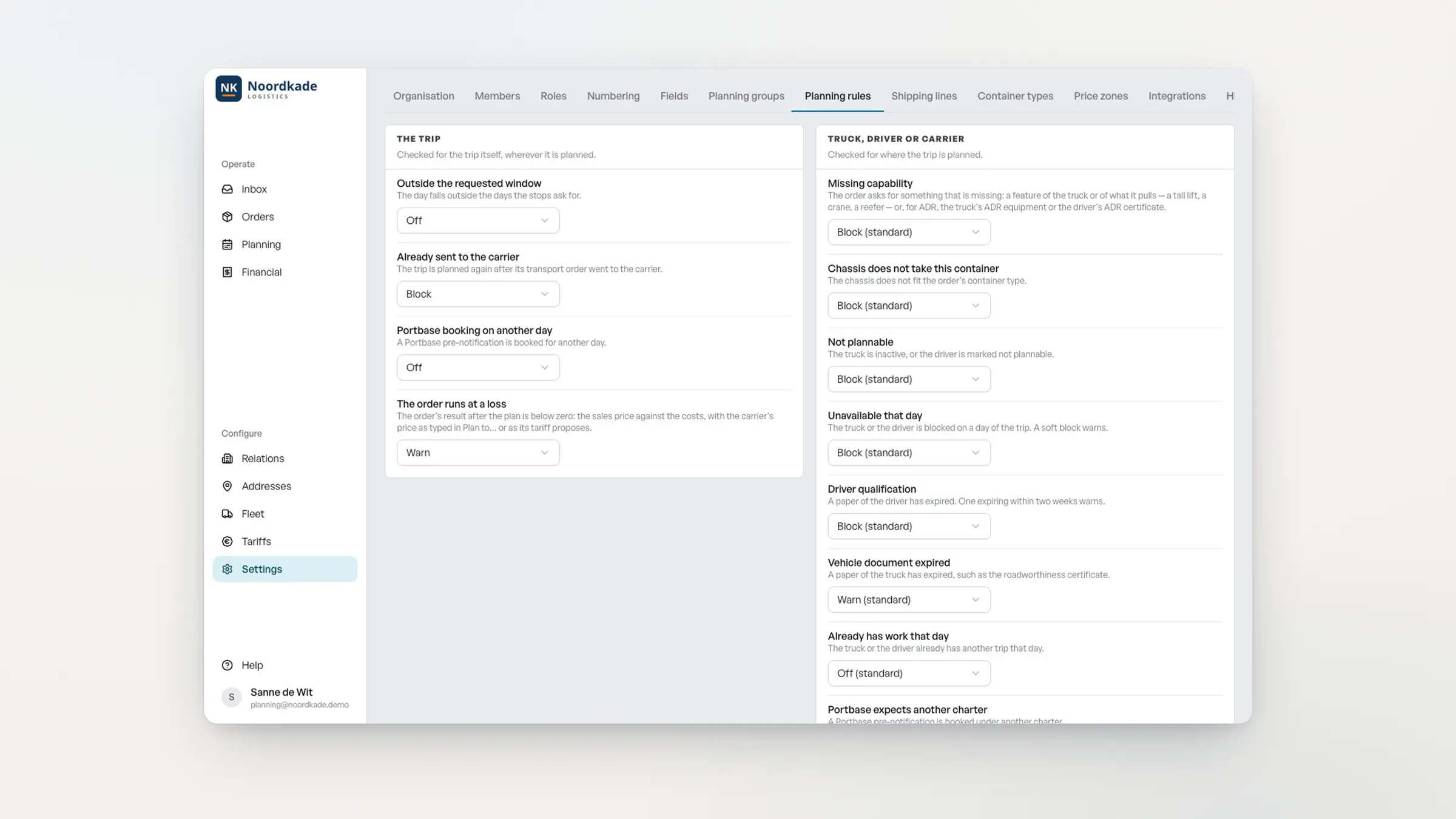
In the planning rules, the planner switches a rule from "Warn" to "Block".
Something doesn't fit? We'll build it.
- [1:32]
What Samurai did for you.
Samurai did: order read and checked, confirmation drafted for the customer, price and fuel surcharge calculated, margin calculated before planning, Portbase status on the order, POD on the order, invoice created, carrier invoice matched, booked in Exact.
You did: 9 actions.
- [1:38]
What does it deliver?
4 hours a day less retyping. ½ FTE: same team, more orders. ≈ €35,000 a year in manual work saved.
Example: 80 orders a day × 3 minutes × €40 an hour × 220 working days.
- [1:45]
Closing
Bonsai automation at Cabooter Group: over €100,000 a year saved on document processing.
Samurai. From email to margin. In one system.
Book a demo.
Business case first, decision second.
Automatic planning: coming soon.
Automated order entry: Samurai reads the email and the attachment, and fills in container, shipping line, addresses and time window. One email with five containers becomes five orders. Transport orders arrive in Dutch, German or English; Samurai reads them all into the same order.
Two AI models read along and check each other; where they disagree, you get a spot check. A wrong container number or a missing field is shown at the top, and every field points to its place in the document.
Route, tolls and waiting time are turned into a cost price, next to your selling price. Drag the order to a truck or carrier; if the trip loses money, Samurai warns you while you drag. One click sends the order to the carrier.
Release, pre-notification and TAR are on the order. The signed CMR and the POD are in the trip file; with the driver app they arrive straight from the cab, with photos.
Someone marks the order as checked. Samurai records who did it and when.
The price comes from the customer's contract, with fuel surcharge, tolls, waiting time and recharges. Invoice per week or per customer, including consolidated invoices.
Samurai reads the carrier's invoice and matches every line to the trip and the agreed rate. Only differences come to you, with the reason.
Sales and purchase invoices go straight to Exact Online, AFAS or Twinfield.
Transport planning without Excel on the side.
Samurai's planning board replaces the spreadsheet next to your TMS. Everything you need to plan is on one screen.
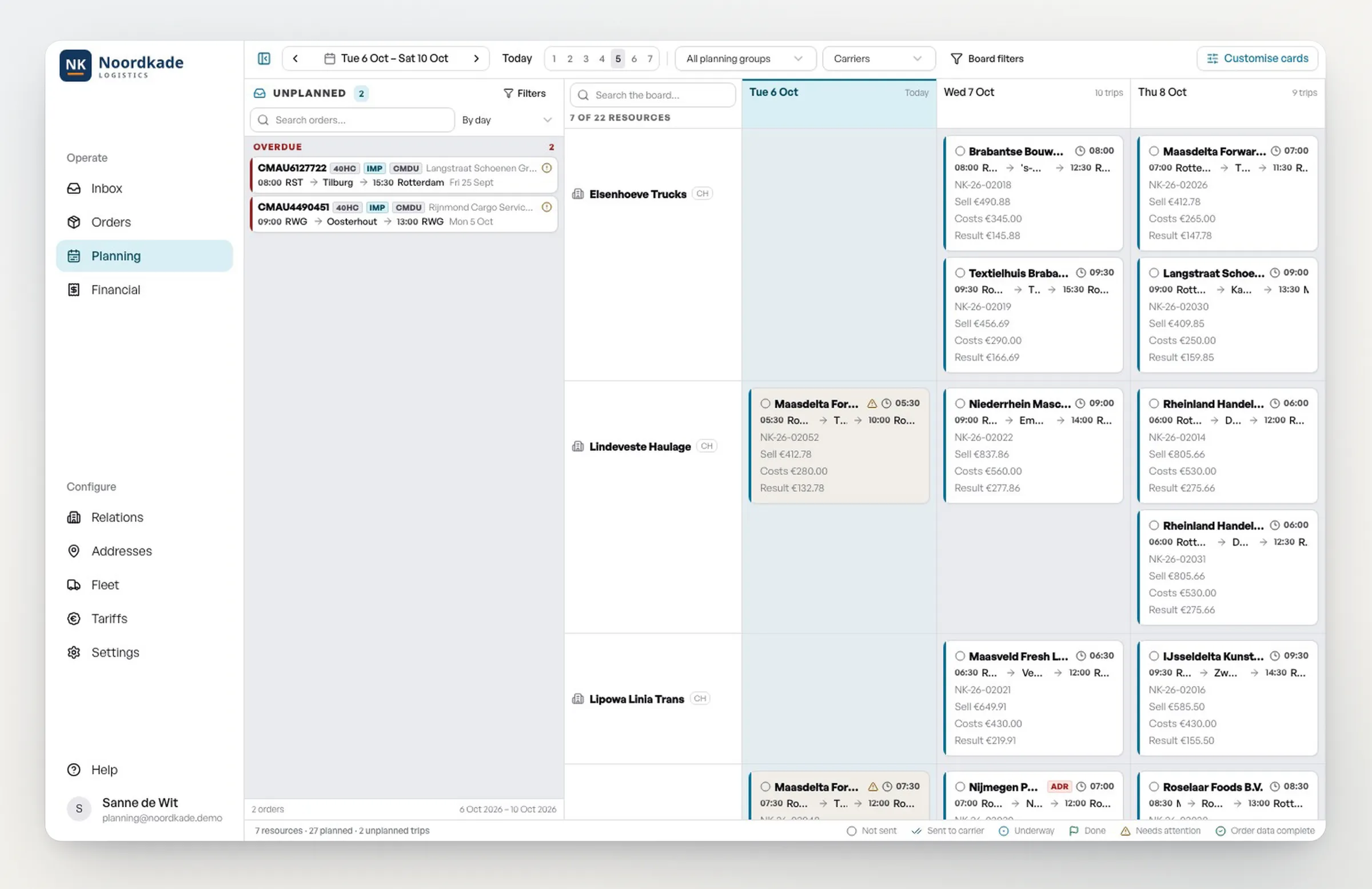
Everything on one board. On the left, the orders still to be planned, with anything late at the top. On the right, your own fleet and your carriers, per day.
Drag and done. Drag an order to a free slot. The trip is there straight away, with times and assignment.
See what still fits. Per day you see how many trips are planned and how much room is left.
Status at a glance. Every card shows whether the trip has been sent, is under way or is done, and what needs attention.
Organised the way you plan. Your own planning groups per desk, such as import, export, shunting and carriers, and cards with exactly the information you want to see.
Samurai keeps watch. Margin and planning rules warn or block while you drag.
One click to the carrier. The order goes out straight away.
Coming soon: automatic planning. Samurai proposes a plan, the planner decides.
Why hauliers switch to Samurai.
Margin before the trip, not after the invoice.
Cost price, selling price and margin sit side by side on the order and on the planning board. A loss-making trip can only be planned with a reason, and that reason is recorded.
Mistakes are stopped.
Planning rules block a truck without ADR, a chassis that doesn't fit the container, a driver with an expired certificate or a Portbase notification at the wrong carrier. For each rule you choose: block, warn or off.
Strong in container haulage.
Portbase on the order, container number check, shipping line, ETA, TAR and time slot, ADR with UN number and class, chassis and containers in your equipment.
A TMS that adapts to you.
Your own rates per customer, your own rules, fields, numbering and planning board cards. Something doesn't fit? We'll build it.
A previous-generation TMS versus Samurai
| Previous-generation TMS | Samurai | |
|---|---|---|
| Order entry | Previous-generation TMSRetyped from email and PDF | SamuraiRead from the inbox, you approve |
| Quotes | Previous-generation TMSTemplate filled in by hand | SamuraiAI drafts the quote from the request and the costing |
| Planning | Previous-generation TMSExcel or WhatsApp next to the TMS | SamuraiOne planning board with own fleet and carriers |
| Margin | Previous-generation TMSVisible after the invoice | SamuraiCost price and margin before planning |
| Mistakes | Previous-generation TMSFound afterwards | SamuraiStopped by planning rules |
| Portbase | Previous-generation TMSSeparate screen or manual work | SamuraiStatus and TAR on the order |
| Carrier invoices | Previous-generation TMSCompared line by line | SamuraiMatched automatically, only differences come to you |
| Accounting | Previous-generation TMSDouble entry | SamuraiBooked in Exact, AFAS or Twinfield |
| Changes | Previous-generation TMSWaiting for the vendor | SamuraiConfigure it yourself, or Bonsai builds it |
| Go-live | Previous-generation TMSMonths | SamuraiWeeks |
| Price | Previous-generation TMSLicences on request | SamuraiPublic, per truck |
Same team, more orders.
Uncut: from inbox to planned in 39 seconds.
One continuous take, not sped up.
- less retyping
- 4 hours a day
- room in your team
- ½ FTE
- in manual work saved
- ≈ €35,000 a year
Example: 80 orders a day × 3 minutes of retyping × €40 an hour × 220 working days.
On top of that, you see loss-making trips before planning, not at month-end close.
Proof: Bonsai automation at Cabooter Group: over €100,000 a year saved on document processing.
Work it out for your business.
Example based on your input. In the demo we work it out on your own orders.
Book a demo with these numbersTen modules, one system.
From request to booking, without separate packages on the side.
Samurai works the way you work.
No need to squeeze into a standard package. You set Samurai up around how you work:
- rates per customer, with zones, lanes, surcharges and the fuel table;
- planning rules, each set to block, warn or off;
- the fields you see and which ones are required;
- order and invoice numbers in the format of your accounting system;
- planning board cards with exactly the information you want to see;
- invoices in your own house style.
And if something really doesn't fit? We'll build it. What we build for you is yours.
Connects to what you already use.
- Portbase
- your Microsoft 365 mailbox
- accounting (Exact Online, AFAS, Twinfield)
- on-board computers and telematics
- customer portals and EDI
- routing and toll costs
- Dottle for document processing
- your own API and webhooks
A public price. The bigger your fleet, the less you pay.
You pay a one-off onboarding fee and then a monthly amount per active truck. No licence bundles, no minimum.
- Up to 20 trucks€40per truck per month
- 21 to 50 trucks€35per truck per month
- More than 50 trucks€30per truck per month
Above one hundred trucks we make a separate arrangement. Changes to existing flows are charged afterwards, always only after your approval.
Business case first. Then live in weeks, not months.
Business case.
In the demo we take a few of your own orders and work out what Samurai delivers for your volume. Only then do you decide.
Setup.
We set Samurai up around your trip types, rates, relations and working agreements, and connect your accounting, mailbox and Portbase.
Go-live.
We start with the trip types that cover most of your volume, then expand.
After that.
Accounting, on-board computers and customer portals stay in place and are connected. Your data stays yours, runs in the EU and can always be exported.
Frequently asked questions about Samurai TMS
What is Samurai TMS?
Samurai TMS is a transport management system by Bonsai Software, a software company based in Rotterdam, for hauliers and freight forwarders in road transport, from container haulage to subcontracted haulage and distribution. It processes transport orders from the inbox, calculates the cost price and margin per trip, tracks Portbase on the order and books sales and purchase invoices in the accounting system.
Which companies is Samurai suited to?
Hauliers and freight forwarders with roughly ten to two hundred trucks, their own or from regular subcontracted carriers, who receive orders by email and PDF. Samurai pays off most from around 25 orders a day.
Is Samurai only for container haulage?
No. Samurai is a TMS for road transport, national and international: container haulage, subcontracted haulage and distribution with fixed routes. For container work, Portbase, the container number check and the TAR are built in. You only use them if you need them.
How does automated order entry from email work?
Samurai reads the email and the attachment, and fills in the order for each transport order: customer, container, shipping line, addresses, dates and time windows. One email with several containers becomes several orders. Two AI models check each other; anything that differs is shown at the top. You approve, and it becomes an order.
Does Samurai read orders in other languages?
Yes. Transport orders arrive in Dutch, German or English, and Samurai reads them into the same order. The demo shows a Dutch and a German order, both read without corrections. Samurai itself is available in English and Dutch.
Does Samurai work for hauliers outside the Netherlands?
Samurai handles national and international road transport and reads orders in Dutch, German and English. It is built for the Dutch market: Portbase, Exact Online, AFAS and Twinfield are connected as standard. Working with other systems? We go through the connections with you in the demo.
Can we stop planning in Excel?
Yes. Samurai's planning board shows open orders, your own fleet and your carriers on one screen. You plan by dragging, see per day what still fits and see the margin per trip. A spreadsheet next to your TMS is no longer needed.
Can I see the margin per trip before I plan?
Yes. Samurai turns route, tolls and waiting time into a cost price and puts it next to the selling price. If you drag an order to a carrier where the trip loses money, Samurai warns you while you drag. It can then only be planned with a reason, and that reason is recorded.
Does Samurai work with Portbase?
Yes. Release, commercial release, customs and the pre-notification at the terminal are on the order, with the TAR and the time slot as soon as they are available.
Which accounting packages does Samurai connect to?
Exact Online, AFAS and Twinfield. Sales invoices and approved purchase invoices go straight to the accounts, without double entry.
How are carrier invoices checked?
Samurai reads the carrier's invoice and matches every line to the completed trip and the agreed rate. What matches is booked. Only differences come to you, with the reason.
Does Samurai create quotes too?
Yes. Samurai reads a request that is not yet an order and works it out into a quote with lane, tolls, waiting time and surcharges. You check the margin and send it. Once accepted, the quote becomes an order.
Do we have to change the way we work?
No. You set Samurai up with your own rates, rules, fields, numbering and planning board. Anything that really differs, Bonsai builds, in consultation and with a price agreed up front.
What happens to the systems we already have?
Samurai replaces the TMS, not your whole landscape. Accounting, on-board computers and customer portals stay in place and are connected. If you would rather replace nothing, an AI Worker around your current TMS is the better route.
Does Samurai plan automatically?
Not yet. Automatic planning is coming soon: Samurai will propose a plan for each open order, with the reason and a confidence score. The planner always decides.
Does the driver app work offline?
Yes. Registrations and photos are stored locally when the connection is poor and are sent as soon as the driver is back in range.
What does Samurai cost?
You pay a one-off onboarding fee and a monthly amount per active truck: €40 up to 20 trucks, €35 from 21 to 50 trucks and €30 above 50 trucks. Above one hundred trucks we make a separate arrangement.
How quickly can we go live?
In weeks, not months. We start with the trip types that cover most of your volume, then expand.
Who owns the data, and where does Samurai run?
Your operational data stays yours and can always be exported. Samurai runs as SaaS within the EU.
See it on your own orders.
Pick a time. We take a few of your orders and run them live through Samurai, from email to margin.

You'll speak with Lucien Corstjens, contact for road transport and container haulage.
- A 30-minute demo, on your trip types
- By video call or at our office in Rotterdam
- You get the business case and the price for your fleet
Rather outline your situation first?
Send a short note on what you're running into. You'll hear from Lucien within one working day.
Get in touch